Qoder Integration
How to use GCSpec in Qoder assistant
🔥 Prerequisites
Ensure Qoder Desktop and Node.js environment are installed, and you have a GCSpec Authorization Key
Configuration Steps
Get Authorization Key
Generate and copy your key in the console
Configure Connection Assistant
Add configuration to Qoder assistant's config file (mcp.json)
Restart Qoder Assistant
Restart application to load new configuration
Test Connection
Verify if GCSpec commands are available
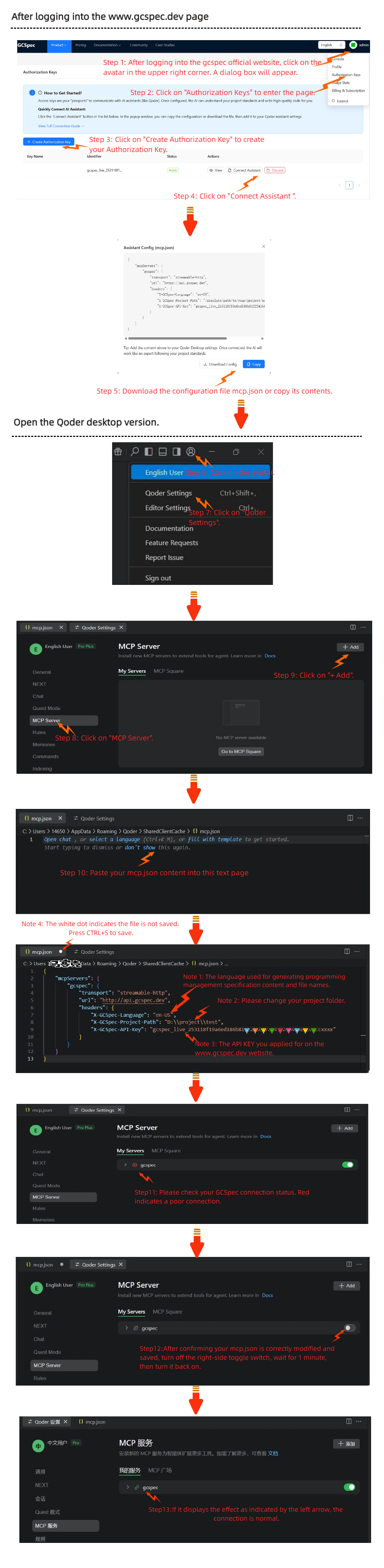
Step 1: Get Authorization Key
- Login to your {link}Console{/link}
- Go to {link2}Authorization Key Management{/link2} page
- Click "Create New Key", enter name (e.g., My Qoder Assistant)
- Copy the generated key and keep it safe
- Note: Key is only shown once; create a new one if lost
Step 2: Configure Connection Assistant
Qoder assistant uses standard connection protocols to communicate with GCSpec. You can add GCSpec service by editing the config file:
Config Confirmation
Please backup the original file before editing and ensure the format is correct.
Step 3: Restart Qoder Assistant
After saving the config file, you need to restart Qoder assistant for changes to take effect.
If you don't see GCSpec commands after restart, check if the config file path is correct.
Test Integration
Follow these steps to verify success:
- Open command palette in Qoder assistant
- Search "GCSpec"
- Execute "GCSpec: Show All Schemes"
- If you see the list of schemes, connection is successful
Config Successful
Congratulations! You can now enjoy the intelligent programming experience provided by GCSpec in Qoder assistant.
Parameter Details
{
  "mcpServers": {
    "gcspec": {
      "transport": "streamable-http",
      "url": "https://api.gcspec.ai",
      "headers": {
        "X-GCSpec-API-Key": "GCSpec Authorization Key",
        "X-GCSpec-Project-Path": "Project Location on your PC",
        "X-GCSpec-Language": "en-US"
      }
    }
  }
}
Advanced: Manual Configuration (for Experts): Core Parameters
Visual Guide
Refer to the image below to complete Qoder assistant configuration:
Tip: Click the image to view fullscreen